
A Practical Guide to Hot Stamping and Foil Artwork
Hot stamping adds real metallic gold or silver to a printed design. It looks simple on the finished card, but the foil does not come from the same file as your print. It needs its own artwork, set up in a specific way.
This guide explains what hot stamping is, the rules your foil artwork has to follow, and how to split one design into the two files we need. The examples use a 90 x 54mm business card, but the method works for any hot stamped item.
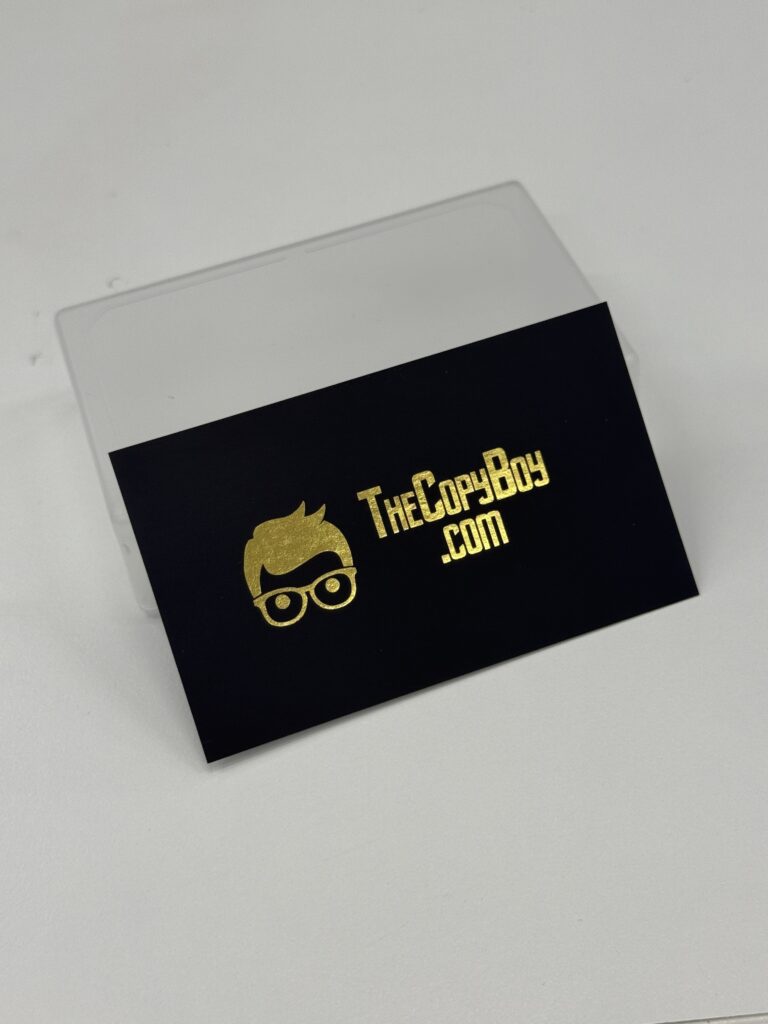
What Is Hot Stamping?
Hot stamping, also called foil stamping or hot foil stamping, is a finishing process that presses a thin metallic foil onto paper using heat and pressure. A metal die is made in the shape of your foil artwork. The die is heated and pressed onto the card with the foil in between, and the foil only sticks where the die touches.
The result is a solid, reflective gold or silver that ink cannot copy. Normal printing uses four inks (cyan, magenta, yellow and black) and none of them is metallic, so a “gold” built from CMYK ink prints as a flat mustard brown. If you want something that actually shines, it has to be foil.
Because the die is made from your artwork, the foil areas must be given to us as a separate file. That is what the rest of this guide is about.
Hot Stamping vs Spot UV vs Gold Ink
- Hot stamping: metallic gold or silver foil on selected areas. Opaque, reflective, one solid colour.
- Spot UV: a clear gloss coating on selected areas, usually on a matt laminated card. It adds shine and contrast but no colour. See our spot UV artwork guide.
- Gold or silver printed in CMYK: just ink. It can suggest a metal colour, but it will not reflect light.
Hot stamping and spot UV are set up the same way, with a separate black file marking where the finish goes. On business cards you can have both, but keep the foil at least 5mm away from any spot UV area. We usually recommend picking one finish per card, because the two compete for attention and the gap rule limits the layout.
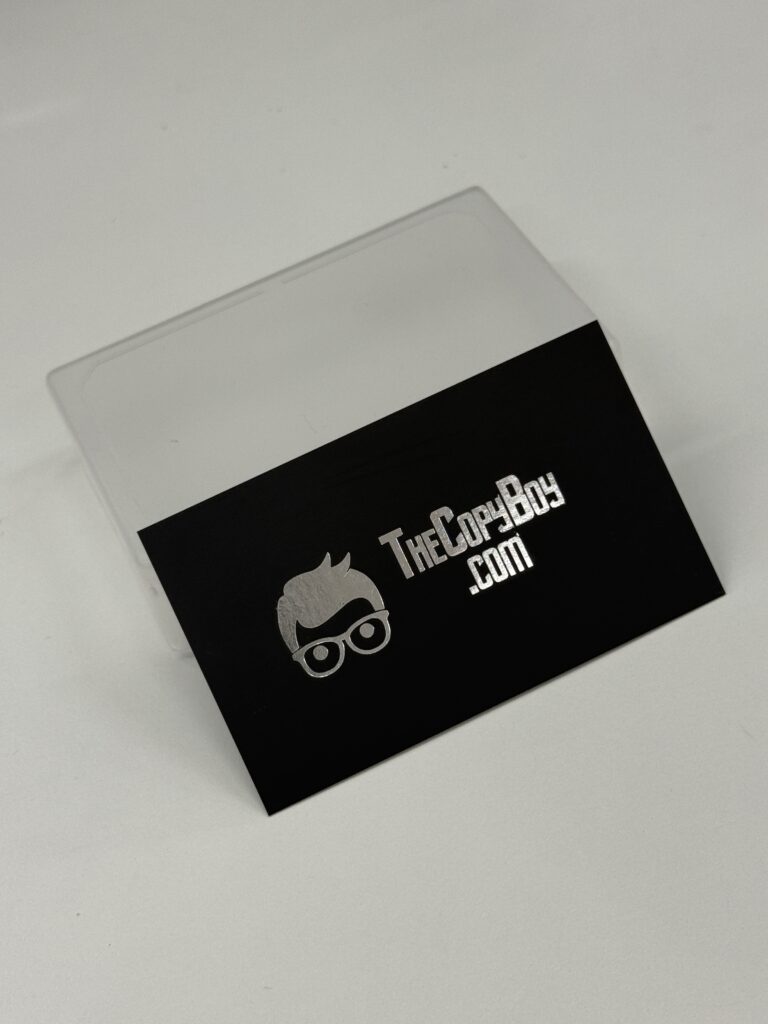
Where You Can Use Hot Stamping
Offset business cards: gold or silver foil on one or both sides, and you can pick a different colour for the front and back. Hot stamping is available on every card stock, including 360gsm, except UV Varnished cards. Hot stamped business cards take 7 to 10 working days.
Red packets: gold or silver foil on 157gsm paper with soft touch lamination. Foil is not available on the 128gsm packets. Gold on red is the traditional choice for Chinese New Year.
For other items, such as invitations or packaging, contact us with the details and we will quote it.
Hot Stamp Artwork Rules
Check these before you start designing. Most hot stamp files that get sent back break one of them.
- One solid colour only. Foil is either there or it is not. Gradients, shadows, tints and photos cannot be foiled. A 50% grey on your foil file does not give you lighter gold.
- Keep it bold. Fine lines, hairline borders and very small text do not foil cleanly. The foil can break up or fill in the gaps. Solid shapes, logos and medium to large text work best.
- Stay 5mm from the trim edge. Foil closer than 5mm to the edge of the card can still be done, but the hot stamp charge is doubled.
- Watch the size. A hot stamp area larger than 1 x 2 inches (about 25 x 51mm) is also charged double. Most logos and names fit well inside this.
- Keep 5mm from spot UV if you are using both finishes on the same card.
- Vector artwork, fonts outlined. Supply AI or PDF files, with all text converted to outlines. Our guide to outlining artwork shows how.
- Same size, same position. The foil file must be exactly the same size as the print file, with bleed included, so the two line up. If you are not sure about bleed, read our basic guide to print bleed.
How to Prepare Your Artwork for Hot Stamping, Step by Step
You will end up with two files: the normal print artwork, and a hot stamp artwork that shows only the foil areas in solid black. This works in Adobe Illustrator, InDesign, Photoshop, Canva or any design tool that lets you duplicate a page or artboard.
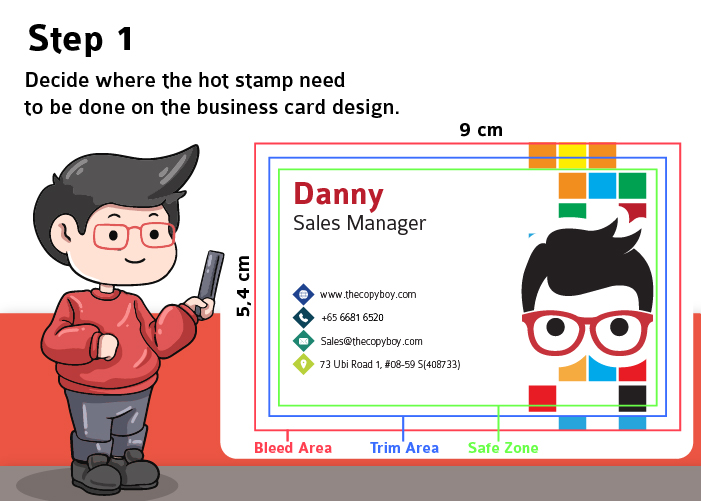
Step 1: Decide What Gets Foiled
Choose which parts of the design will be hot stamped: a name, a logo, a border, an illustration. Keep the rules above in mind. In our example, the name “Danny” and the character illustration will be gold foil, and everything else is normal print.
Set the document up at the finished size with bleed. Our card is 90 x 54mm, with the bleed area, trim line and safe zone marked.
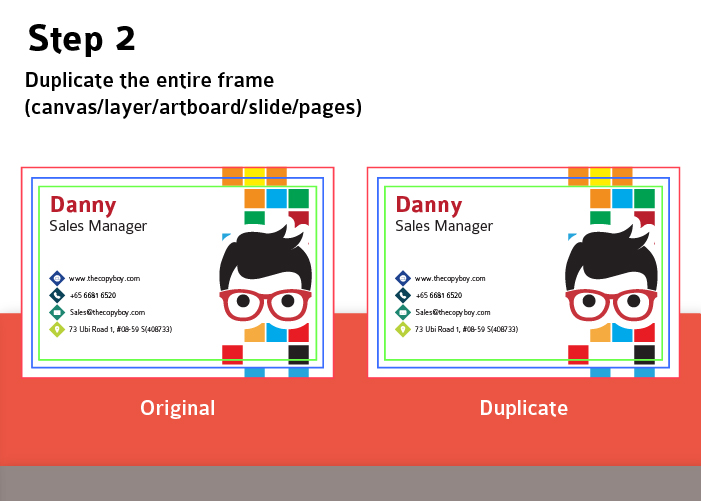
Step 2: Duplicate the Whole Design
Make an exact copy of the entire page, artboard, layer or slide. Do not resize or move anything. You now have an “Original” and a “Duplicate”, and they must stay perfectly aligned with each other.
Step 3: Mark the Foil Areas in 100% Black
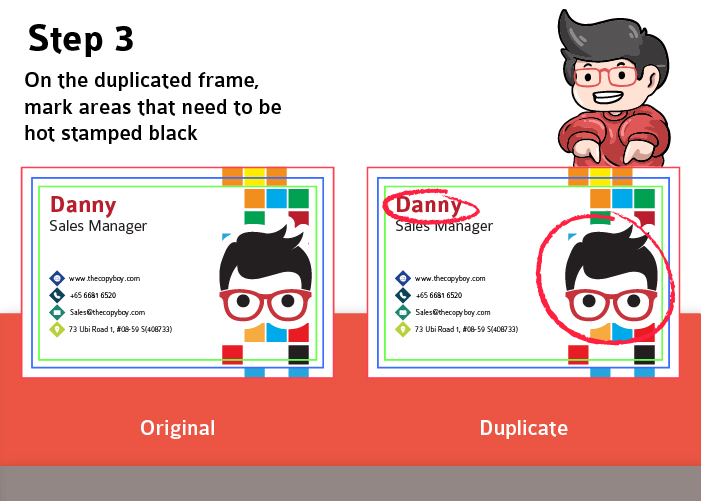
On the Duplicate only, select every element that will be foiled and change it to solid black: C0 M0 Y0 K100. Black on this file does not mean black ink. It is a map that tells us where the foil goes.
Step 4: Separate the Two Artworks
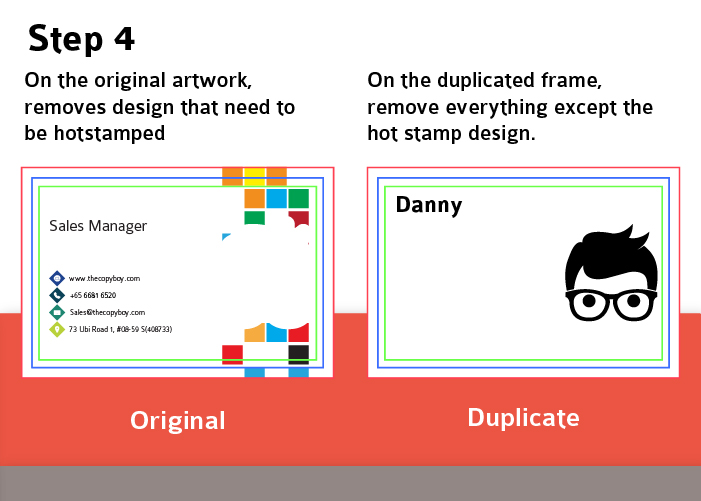
- On the Original (print artwork): delete the elements that will be hot stamped. This file keeps only what is printed in normal ink, including the background.
- On the Duplicate (hot stamp artwork): delete everything except the black foil elements. The rest of the page must be completely blank, with no background colour, guides or crop marks left behind.
Do not move anything while you delete. If the foil shifts on the Duplicate, it will shift on the finished card.
Step 5: Name and Export Both Files
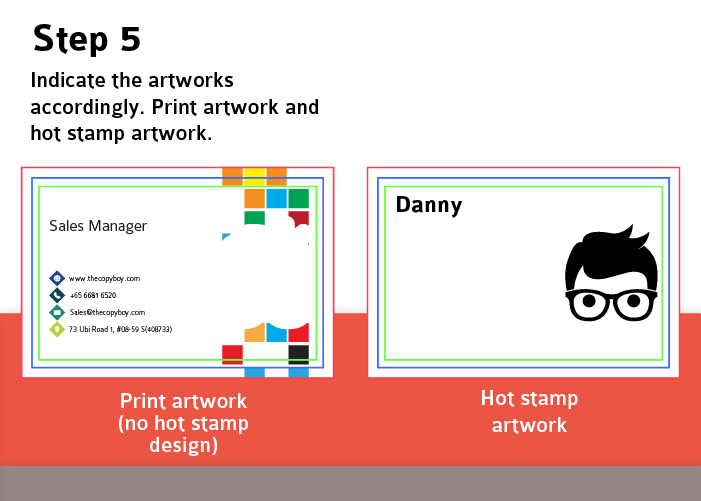
Name the files so there is no doubt which is which, for example Print_Artwork.pdf and Hot_Stamp_Artwork.pdf. If your card is double-sided with foil on both sides, label the front and back of each file too. Export as PDF or AI with fonts outlined, then upload both with your order.
Step 6: The Finished Card
We print the print artwork first, then use your hot stamp artwork to make the die and press the foil in exactly the spots you marked. Two clean, aligned files are what make the foil land where you expect it.

Black Backgrounds Under Gold Foil
Gold or silver foil on a black card is one of the most popular hot stamp looks, as in the photos above. The black background is printed with ink, so it still follows our normal print rules.
We work to a maximum of 240% total ink coverage (C + M + Y + K added together). A black built from C100 M100 Y100 K100 comes to 400%, which prints muddy and dries slowly. For large black areas use C60 M40 Y40 K100, which comes to exactly 240% and still prints a deep, solid black. Our RGB vs CMYK guide explains why.
Hot Stamp Artwork Checklist
- Two files: print artwork and hot stamp artwork, clearly named
- Both files the same size, with bleed, and perfectly aligned
- Foil areas in solid C0 M0 Y0 K100, with nothing else on the hot stamp file
- Foil elements deleted from the print artwork
- No gradients, tints, fine hairlines or very small text in the foil
- Foil at least 5mm from the trim edge, and 5mm from any spot UV
- Fonts outlined, saved as PDF or AI
We print the files you supply, as you supply them. If you are unsure whether your foil design will work, ask your designer to check it against this list before you upload, or send us a message first.
Hot Stamping FAQs
Is hot stamping the same as foil stamping?
Yes. Hot stamping, foil stamping and hot foil stamping all describe the same process: metallic foil pressed onto paper with a heated die.
What foil colours can I choose?
Gold or silver. On double-sided business cards you can choose a different colour for each side.
Can I hot stamp a photo or a gradient?
No. Foil is a single solid colour, so it only works on solid shapes, text and line work. Keep photos and gradients in your print artwork.
Why is my hot stamp charged double?
On business cards the hot stamp charge is doubled when the foil is within 5mm of the trim edge, or when the foil area is larger than 1 x 2 inches. Moving the foil in from the edge or reducing its size avoids it.
Can I have hot stamping and spot UV on the same card?
Yes, as long as the foil and the spot UV are at least 5mm apart. We usually recommend choosing one, because the two finishes compete and the gap limits your layout.
Can I make hot stamp artwork in Canva?
Yes. Duplicate the page, turn the foil elements black on the copy, delete everything else from that page, and remove the foil elements from the original page. Download both pages as a print PDF.
How long do hot stamped business cards take?
7 to 10 working days, compared with 5 to 7 working days for standard cards.
Ready to Order?
Order hot stamped business cards or foil red packets online and upload both files on the order form. Related guides: spot UV artwork, outlining your artwork and print bleed.